Java String
In Java, string is basically an object that represents sequence of char values. An array of characters works same as Java string. For example:
- char[] ch={'j','a','v','a','t','p','o','i','n','t'};
- String s=new String(ch);
The java.lang.String class implements Serializable, Comparable and CharSequence interfaces.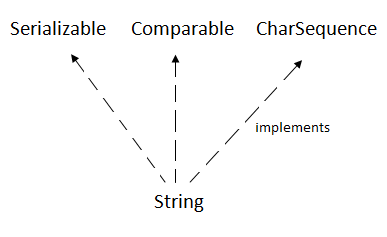
CharSequence Interface
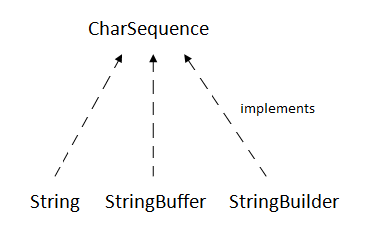
The CharSequence interface is used to represent the sequence of characters. String, StringBuffer and StringBuilder classes implement it. It means, we can create strings in java by using these three classes.
The Java String is immutable which means it cannot be changed. Whenever we change any string, a new instance is created. For mutable strings, you can use StringBuffer and StringBuilder classes.
What is String in java
Generally, String is a sequence of characters. But in Java, string is an object that represents a sequence of characters. The java.lang.String class is used to create a string object.
How to create a string object?
There are two ways to create String object:
- By string literal
- By new keyword
1) String Literal
Java String literal is created by using double quotes. For Example:
String s="welcome";
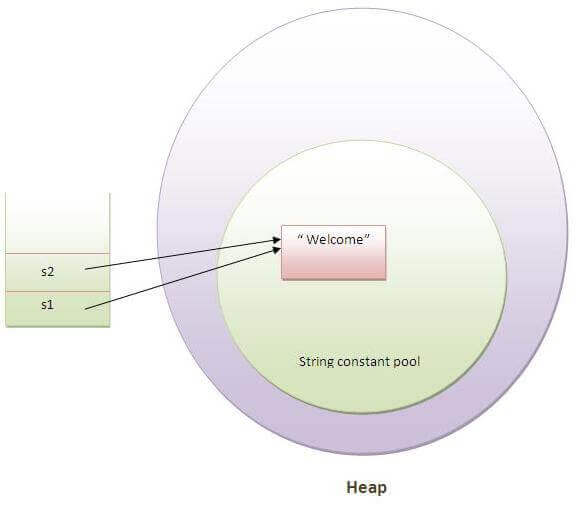
Each time you create a string literal, the JVM checks the "string constant pool" first. If the string already exists in the pool, a reference to the pooled instance is returned. If the string doesn't exist in the pool, a new string instance is created and placed in the pool. For example:
- String s1="Welcome";
- String s2="Welcome";
Note: String objects are stored in a special memory area known as the "string constant pool".
Why Java uses the concept of String literal?
To make Java more memory efficient (because no new objects are created if it exists already in the string constant pool).
2) By new keyword
String s=new String("Welcome");
In such case, JVM will create a new string object in normal (non-pool) heap memory, and the literal "Welcome" will be placed in the string constant pool. The variable s will refer to the object in a heap (non-pool).
Java String Example
- public class StringExample{
- public static void main(String args[]){
- String s1="java";
- char ch[]={'s','t','r','i','n','g','s'};
- String s2=new String(ch);
- String s3=new String("example");
- System.out.println(s1);
- System.out.println(s2);
- System.out.println(s3);
- }}
Output:
Immutable String in Java
In java, string objects are immutable. Immutable simply means unmodifiable or unchangeable.
Once string object is created its data or state can't be changed but a new string object is created.
- class Testimmutablestring{
- public static void main(String args[]){
- String s="Sachin";
- s.concat(" Tendulkar");
- System.out.println(s);
- }
- }
Output:Sachin
Now it can be understood by the diagram given below. Here Sachin is not changed but a new object is created with sachintendulkar. That is why string is known as immutable.
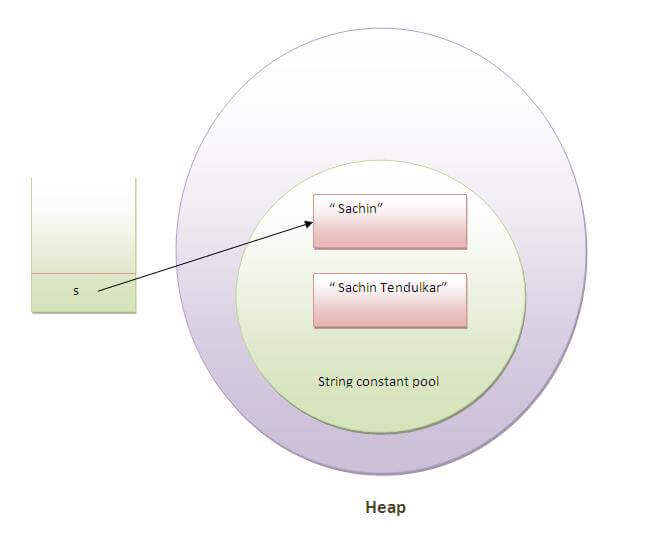
As you can see in the above figure that two objects are created but s reference variable still refers to "Sachin" not to "Sachin Tendulkar".
But if we explicitely assign it to the reference variable, it will refer to "Sachin Tendulkar" object.For example:
- class Testimmutablestring1{
- public static void main(String args[]){
- String s="Sachin";
- s=s.concat(" Tendulkar");
- System.out.println(s);
- }
- }
In such case, s points to the "Sachin Tendulkar". Please notice that still sachin object is not modified.
Why string objects are immutable in java?
Because java uses the concept of string literal.Suppose there are 5 reference variables,all referes to one object "sachin".If one reference variable changes the value of the object, it will be affected to all the reference variables. That is why string objects are immutable in java.
Java String compare
 We can compare string in java on the basis of content and reference. We can compare string in java on the basis of content and reference.
It is used in authentication (by equals() method), sorting (by compareTo() method), reference matching (by == operator) etc.
There are three ways to compare string in java:
1. By equals() method
2. By = = operator
3. By compareTo() method
1) String compare by equals() method
The String equals() method compares the original content of the string. It compares values of string for equality. String class provides two methods:
- public boolean equals(Object another) compares this string to the specified object.
- public boolean equalsIgnoreCase(String another) compares this String to another string, ignoring case.
class Teststringcomparison1{
public static void main(String args[]){
String s1="Sachin";
String s2="Sachin";
String s3=new String("Sachin");
String s4="Saurav";
System.out.println(s1.equals(s2));//true
System.out.println(s1.equals(s3));//true
System.out.println(s1.equals(s4));//false
}
}
Output:true
       true
       false
- class Teststringcomparison2{
- public static void main(String args[]){
- String s1="Sachin";
- String s2="SACHIN";
-
- System.out.println(s1.equals(s2));
- System.out.println(s1.equalsIgnoreCase(s2));
- }
- }
Output:
false
true
2) String compare by == operator
The = = operator compares references not values.
- class Teststringcomparison3{
- public static void main(String args[]){
- String s1="Sachin";
- String s2="Sachin";
- String s3=new String("Sachin");
- System.out.println(s1==s2);
- System.out.println(s1==s3);
- }
- }
Output:true
false
3) String compare by compareTo() method
The String compareTo() method compares values lexicographically and returns an integer value that describes if first string is less than, equal to or greater than second string.
Suppose s1 and s2 are two string variables. If:
s1 == s2 :0
s1 > s2 :positive value
s1 < s2 :negative value
- class Teststringcomparison4{
- public static void main(String args[]){
- String s1="Sachin";
- String s2="Sachin";
- String s3="Ratan";
- System.out.println(s1.compareTo(s2));
- System.out.println(s1.compareTo(s3));
- System.out.println(s3.compareTo(s1));
- }
- }
Output:0
1
-1
String Concatenation in Java
In java, string concatenation forms a new string that is the combination of multiple strings. There are two ways to concat string in java:
- By + (string concatenation) operator
- By concat() method
1) String Concatenation by + (string concatenation) operator
Java string concatenation operator (+) is used to add strings. For Example:
- class TestStringConcatenation1{
- public static void main(String args[]){
- String s="Sachin"+" Tendulkar";
- System.out.println(s);
- }
- }
- Output:Sachin Tendulkar
- The Java compiler transforms above code to this:
- String s=(new StringBuilder()).append("Sachin").append(" Tendulkar).toString();
In java, String concatenation is implemented through the StringBuilder (or StringBuffer) class and its append method. String concatenation operator produces a new string by appending the second operand onto the end of the first operand. The string concatenation operator can concat not only string but primitive values also. For Example:
- class TestStringConcatenation2{
- public static void main(String args[]){
- String s=50+30+"Sachin"+40+40;
- System.out.println(s);
- }
- }
Output:
80Sachin4040
Note: After a string literal, all the + will be treated as string concatenation operator.
2) String Concatenation by concat() method
The String concat() method concatenates the specified string to the end of current string. Syntax:
public String concat(String another)
Let's see the example of String concat() method
- class TestStringConcatenation3{
- public static void main(String args[]){
- String s1="Sachin ";
- String s2="Tendulkar";
- String s3=s1.concat(s2);
- System.out.println(s3);
- }
- }
Sachin Tendulkar
Substring in Java
A part of string is called substring. In other words, substring is a subset of another string. In case of substring startIndex is inclusive and endIndex is exclusive.
Note: Index starts from 0.
You can get substring from the given string object by one of the two methods:
- public String substring(int startIndex): This method returns new String object containing the substring of the given string from specified startIndex (inclusive).
- public String substring(int startIndex, int endIndex): This method returns new String object containing the substring of the given string from specified startIndex to endIndex.
In case of string:
- startIndex: inclusive
- endIndex: exclusive
Let's understand the startIndex and endIndex by the code given below.
- String s="hello";
- System.out.println(s.substring(0,2));
In the above substring, 0 points to h but 2 points to e (because end index is exclusive).
Example of java substring
- public class TestSubstring{
- public static void main(String args[]){
- String s="SachinTendulkar";
- System.out.println(s.substring(6));
- System.out.println(s.substring(0,6));
- }
- }
O/P
|